CorePlus – Fortune Wheel
🔧 Overview
The CorePlus Fortune Wheel offers:
🎨 2 Unique Visual Styles
🔢 7 Variants per Style (2 to 8 segments)
🧩 Fully customizable UI
📦 Drag-and-drop Blueprint widgets
🔁 Easy event binding and result logic
📁 Accessing the Plugin Content
Before you begin using CorePlus AR, you need to access the plugin content. There are two ways to do this:
✅ Method 1: Project Plugin Folder (Editable)
Copy CorePlus Plugin from:
[UE_Install]/Engine/Plugins/Marketplace/CorePlusPluginTo:
[YourProject]/Plugins/In Unreal Editor:
Open Content Browser
Click the ⚙️Settings Option (top-right)
Enable Show Plugin Content
You’ll now see:
Plugins > CorePlusContent
Pros
✅ Easy access and customization
✅ Built directly into your project
✅ Editable plugin files
Cons
⚠️ No auto-updates — you must update it manually
✅ Method 2: Engine Plugin Content (Auto-updating)
Enable CorePlus Plugin via the Plugin Manager
In Content Browser:
Open Content Browser
Click the ⚙️Settings Option (top-right)
Enable Show Engine Content
Navigate to:
Engine > Plugins > CorePlusContent
Pros
✅ Always up-to-date with Unreal Engine
Cons
⚠️ Plugin content is not directly editable
Tip: Choose the method that best fits your workflow — editable plugin content or automatic updates.
🗺️ Explore the Example Map
Preview all wheels:
Path:CorePlusContent > Fortune Wheel > Maps > Map_CorePlus_FortuneWheel_Main
🖱️ Right-click + drag to scroll through wheel gallery
🔄 Both Style 01 & Style 02 included
🔢 Each with 2–8 segment variations
🧩 How to Use in Your Project
To implement the Fortune Wheel in your own UI:
1. Choose a Wheel Component
Go to:CorePlusContent > Fortune Wheel > Blueprints > UI > Example
Pick any of the example widget:
Style 01:
CorePlusFortuneWheel01_4(example: 4 segments)Style 02:
CorePlusFortuneWheel02_6(example: 6 segments)
Or create your own and add the corresponding component manually:
CorePlusFortuneWheel[Style][Options]3. Handle Results
In the widget’s Blueprint:
In the Event Graph, locate Event Construct
Get a reference to the Fortune Wheel Component
Bind the event
OnSpinFinish
This event will return the selected result once the spin ends.

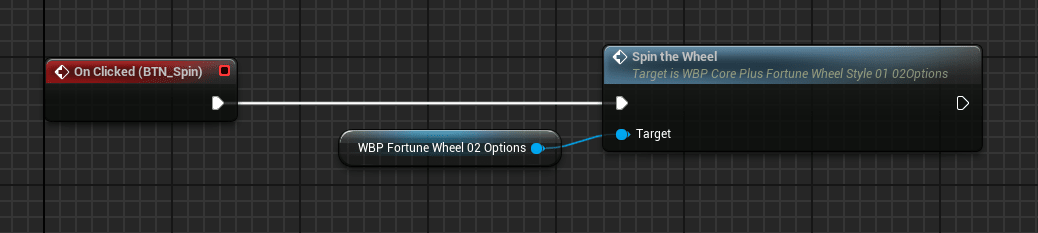
4. Trigger a Spin
To spin the wheel:

That’s it — your Fortune Wheel is now live and ready to spin!

🔄 Customization Tips
You can modify the result logic, visuals, and icons as needed.
Supports drag-and-drop integration into any user interface.
Works with both static and dynamic option lists.
📎 Related Links
Tags
unreal engine, game development, coreplus fortune wheel, fortune wheel plugin, unreal engine plugin, spin wheel system, blueprint fortune wheel, ue5 game plugin, customizable fortune wheel, sci-fi game UI, gamification tools, reward spinner, unreal marketplace plugin, interactive wheel system, lucky wheel for games, game UI components, drag and drop blueprint, spin to win system, unreal engine sci-fi plugin, blueprint game mechanics